Create a project in ClimMob
Sofia Acuna, Marylin Manrow
Get started with ClimMob: learn what it is, create your account, and set up your first project.
Introducing ClimMob: A software platform for experimental citizen science in agriculture
ClimMob supports tricot trial implementers in evaluating technology options across diverse contexts with a one-platform solution to design, manage, and share experiments. It helps implementers plan and monitor processes while ensuring that relevant outputs reach researchers, field agents, and trial participants at the right time. This enables effective trial operations and agile, data-based decisions, underpinned by an excellent user experience.
ClimMob is a free, open-source, online platform for participatory testing projects. It guides users through all stages of their tricot projects: from project design and generation of randomized test packages, to efficient data collection, automated analysis, and reporting.
- Current version: ClimMob 3
- Data collection: via the Android app ODK Collect
- Analysis: uses the R package ClimMobTools
Requirements: An Android smartphone or tablet for field data collection
Why ClimMob?
Participatory testing in agriculture can be complex, involving multiple actors—such as project implementers, field agents, and farmers—often across different regions or countries. These projects generate large volumes of data that must be organized, validated, and analyzed.
ClimMob was custom-built to streamline this complexity by supporting:
- Project design and planning
- Generation of randomized test packages
- Efficient data collection and storage
- Monitoring of data and project progress
- Automated data analysis and reporting
By simplifying all stages of the workflow, ClimMob makes tricot projects more manageable, scalable, and successful.
Software architecture and design principles
Design philosophy
ClimMob’s architecture was shaped by the need for a feasible and project-owner-oriented workflow, while also addressing the requirements of breeders, researchers, and field agents. The platform is designed primarily for scientists and project coordinators who lead participatory trials, ensuring they can manage projects efficiently while keeping outputs relevant for farmers and decision-makers. The software and workflow (shown below) were developed in parallel to ensure technical coherence, usability, and alignment with real-world project management needs.
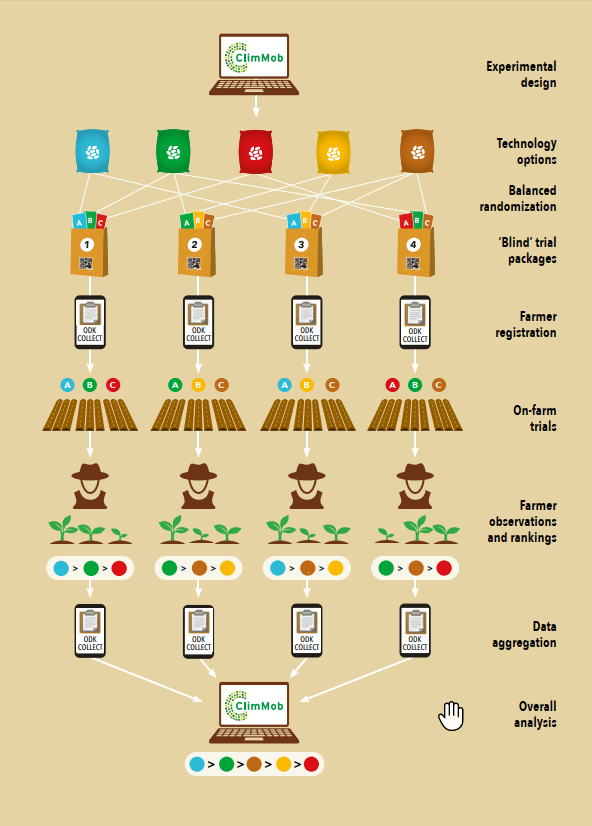
ClimMob is built using Component-Based Software Engineering (CBSE). This allows for a flexible and modular platform that is easy to update and maintain.
ClimMob is based on robust, widely adopted open-source components, including:
- Open Data Kit (ODK)
- ODK Tools
- PyUtilib Component Architecture
All data analysis is conducted through R packages, particularly the ClimMobTools package, ensuring reproducibility and transparency.
User-centered development
From the beginning, ClimMob has followed an iterative and user-centered development process, marked by:
- Ongoing feedback from users
- Short communication loops between developers and field teams
- Continuous improvements based on real-world use
This has resulted in a platform that adapts to the evolving needs of agricultural innovation projects.
Who uses ClimMob—and how?
ClimMob was built to support a range of users within participatory testing projects:
Implementers (project leaders) - They benefit from tools for project setup, assigning field agents, and managing test packages. ClimMob also offers automatic statistical reports, enabling data-informed decision-making.
Field Agents - They register participants and collect data using the ODK Collect app. This ensures data entry is quick, efficient, and synchronized with ClimMob.
Testers (farmers or participants) - They receive their test results soon after data submission. This rapid feedback helps them learn from peers and adopt the most promising technologies.
What’s next for ClimMob?
Ongoing development of ClimMob focuses on:
- Improving user experience (UI/UX)
- Expanding data types and media (e.g. audio, photos, sensor data)
- Enhancing integration with other platforms
- Strengthening support for data-driven agricultural decision-making
Create a ClimMob account
Create your personal account on ClimMob. If you have already registered an account, you can log in straight away.
How-to:
Visit the ClimMob online software.
On the left upper corner, click on Login or register an account.
If you already have an account, enter your username and password and click on Login (green button).
If you don't have an account, click on Create an account (white button) which you will find under Login.
-
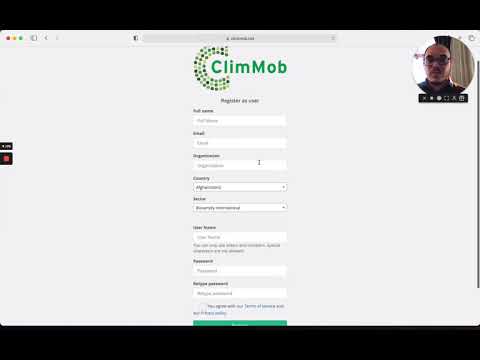
Fill in all the requested fields:
a. Full name: your name and surname
b. Email: your email address c. Organization: the organization you are working for, e.g. Alliance Bioversity – CIAT
d. Country: select your country from the drop-down menu
e. Sector: select the type of sector you are working for from the drop-down menu
f. Username: the name you will use to enter the ClimMob dashboard
g. Password: the password you will use to enter the ClimMob dashboard
h. Retype password: retype the password you have entered above
i. Agree with our Terms of service and our Privacy Policy
j. Finally, click on register and your account will be set
Video tutorial - Create an account
Get familiar with ClimMob
When users log into ClimMob for the first time, they are welcomed with a guided setup designed to help them configure the platform before creating their first project. This workflow ensures that key components are defined early, streamlining future project setup.
Navigate the main menu
The main menu is located on the left side of the screen and gives access to key areas of the platform, including your projects, library items, and tools.
Here is the order in which these onboarding messages appear:
Libraries
Libraries are centralized repositories for elements that will be reused in multiple projects, such as agents, technologies, and questions.
- Field agents: are the individuals responsible for registering farmers and collecting data in the field. You’ll define them once and assign them across multiple projects.
- Technologies: are the options that farmers will evaluate—for example, different seed varieties, soil treatments, or planting methods. These are stored in the library for future use.
- Questions: ClimMob provides a rich library of premade evaluation questions developed by the 1000FARMS team, available in multiple languages and ready to use across projects. This library helps ensure consistency and comparability in data collection. In addition, you can also define your own custom questions—such as “Which variety grew fastest?” or “Which option tasted better?”—which will then be stored and reused in future projects.
Downloads
This menu option gives access to tools and resources needed for field implementation, including:
- Field data collection templates
- Survey forms
- ClimMob documentation
- R analysis tools
Setting up a new ClimMob project
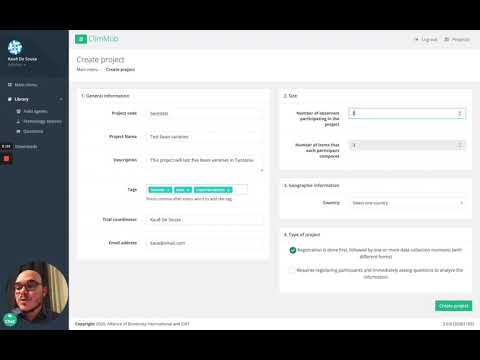
To start working with ClimMob, your first step is to create a new project. You can do this in two ways: either by going to the Project Overview section and clicking Create a new project, or by navigating to All projects and selecting Add new project. In both cases, you will be asked to complete a short form with the main project details. Once created, you can always return later to update or adjust the project settings.
To set up a profile for your tricot project. Fields to fill:
- General information
-
Project name: Unique and more descriptive name for the project. We recommend including the technology, the year or time, and the location, to distinguish the project from others, when you manage multiple projects. For example: Bean_Honduras_2019_season1
-
Project ID: Short, unique identifier of the project. For example, your initials and year of the project: JV19.
-
Description: Add more detail about the project.
-
Keywords: To make your project searchable, enter up to X keywords that define your project. Examples: “bean”, “Honduras”.
-
Trial coordinator: Your full name, start with your first name, all names separated by a space. By default, it is already filled with your data. Change if the trial coordinator is someone else.
-
Email address: Your email address.
-
Affiliation: Select one or create a new affiliation, if any of the options applies to your organization.
- Geographic information
- Select the country where the project will take place
- Participants
- Number of participants: Enter how many participants will join this project. For example: 200. If you don’t know the exact number yet, better choose a number too high than too low (but still reasonable, as otherwise ClimMob will do a lot of unnecessary computing later on).
- Technology options labels
- Number of technology options each participant compares: By default, this is set to ‘3’ and cannot be changed. It’s a reminder that in a tricot project, every participant will receive 3 technology options to compare.
- Name given to the 3 items that each participant compares: by default the names are “Option A, Option B and Option C” but the trial coordinator could decide to change them for something else that participants can relate to better, such as numbers, colors or shapes.
- Project type
- You can indicate whether the project is a training project. This means the project was created for educational purposes—such as practice, demonstrations, or coursework—and not intended for actual data collection in the field.
- There are three options for experimental site: on-farm testing, home, or public space (e.g., market). Depending on the experimental site selected, you will need to choose between different units of analysis and corresponding objectives (see examples in box below).
- Do you want to create your project from a template? Select if it applies to your project.
- Finally, you can select up to four languages in which the participant forms will be provided, allowing multilingual data collection as needed.
Video tutorial
Create a new project
Select technology options
In this section, you can specify the technology options you want to compare in your tricot experiment. We recommend you select a pool of 7 to 20 technology options.
For example, if you want to test which bean variety of a pool of 7 to 20 bean varieties is best adapted to the region you are running your tricot experiment in, you would add the names of all bean varieties here. If you want to include 7 bean varieties in the experiment, or 20, or anything in between, depends on the experiment you have in mind.
If you want to test which fertilizer regime of a pool of 10 to 20 different fertilizer regimes makes crops grow best, you would add the names of these 10 to 20 fertilizer regimes here.
How-to:
-
On the project overview section click on green button, Select technology options.
-
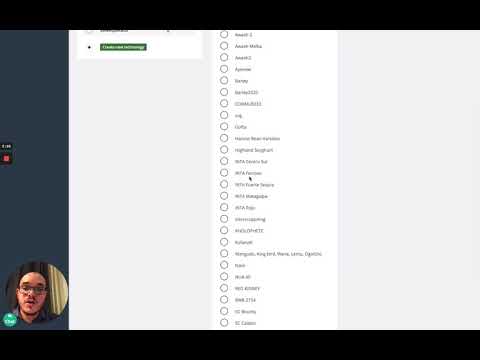
You will access the list of available technologies in the platform. If the technology you are interested in is there, just click on it and access the different options (e.g. varieties).
-
If the technology you are interested in is not there, click on + add new technology. This action will redirect you to the library, where you can create new technologies.
Video tutorial - Filling the ClimMob library with new technologies (e.g. varieties) to test in the tricot trials
Prepare data collection form
In this section, you define the different data collection moments for the on-farm evaluation that participants will carry out. At each moment, specific questions will be asked to capture observations. It is important to decide:
- Which traits will be evaluated in the selected technology options?
- When will each trait be evaluated during the planting cycle?
Once set up, these data collection forms will guide field agents and participants during the evaluation process.
How-to:
-
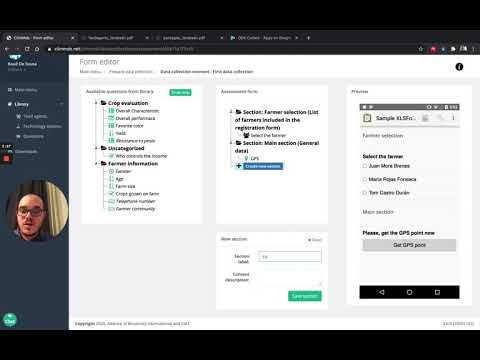
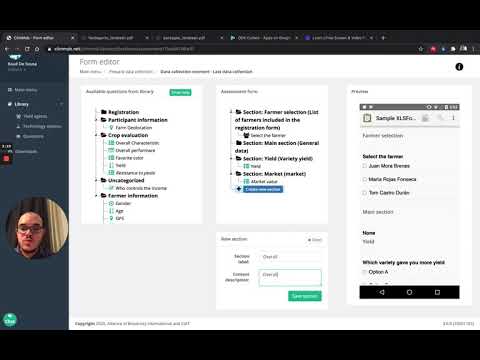
On the project definition section, click Prepare data collection. Here you can add the different data collection moments throughout the planting cycle.
-
After adding the data collection moments, go to the right panel (Active data collection moments) and click Show to view them.
-
For each data collection moment, drag the desired questions from the left panel (available questions from the library) into the middle panel (assessment form). A preview of the selected questions will appear on the right panel (preview)—scroll down to view all questions.
-
If the question you need is not in the library, click Add new question and create it under the most relevant section.
Video tutorials
Project setup - Data collection survey, part 1
Project setup - Data collection survey, part 2
Technology randomization
After setting up your data collection moments and their corresponding questions, the next step is to create test packages through technology randomization. This process ensures that each participant receives a balanced set of technology options for evaluation.
How-to:
-
On the project overview section (right side of the screen), click Generate packages with technology options to open the participant registration form.
-
Set combinations:
- Choose whether to include all technology options or only a selection.
- Define how many packages with each technology option will be generated.
- By default, all technology options are included, and the same number of packages are created for each.
WARNING If you change the number of packages for one technology, you must balance the total by adding or subtracting from others to ensure the same overall number of packages.
-
Review packages and CONFIRM. If the list of packages is not confirmed, it will be lost, and you will need to repeat the randomization.
-
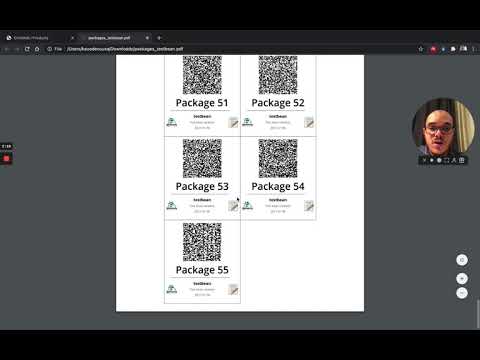
Once confirmed, the randomization documents are available in the Downloads section:
- List of packages with QR codes for the registration form → required for preparing test packages.
- List with randomized trial packages (Excel) → shows the technology combinations assigned to each package. This file is useful when preparing test packages. Do not edit this file.
Video tutorials:
Project setup - Registration files
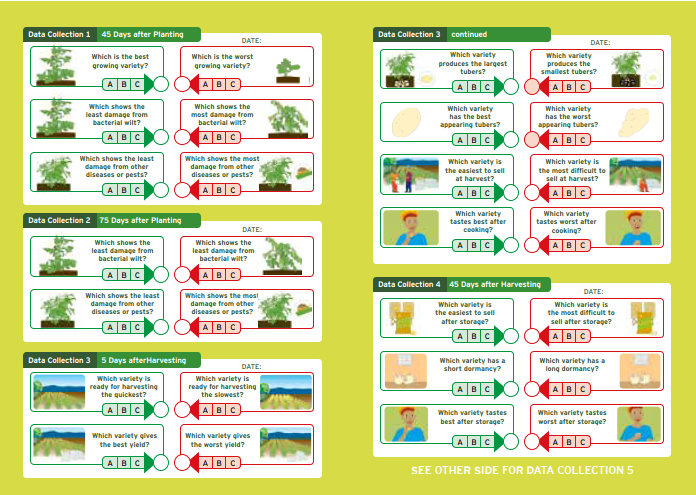
Prepare observation cards
In this step, you define and manage the questions that participants will answer during their tricot trial about the performance of their assigned technology options. These are always comparison questions, allowing participants to rank their field observations. The finalized questions will be printed on the observation cards that are handed out to participants.
How-to (two steps):
- Define time points
Decide when participants should make their observations during the trial.
Example: For a bean variety test, you might ask participants to observe at three stages:
- Day of sowing (start of the project)
- 30 days after sowing (mid-point)
- Day of harvest (end of the trial)
- Define observations
Based on the technology options being tested, determine which specific observations participants should make.
Each observation corresponds to one question on the observation card.
Example:
- Plant height → “Which variety grows tallest?”
- Stress tolerance → “Which variety looks healthiest?”