Dissemination and sharing data
Open access publication of the data should be a goal of the trial. Tricot has already published a number of sizable datasets from on-farm trials (de Sousa et al., 2021; Moyo et al., 2021; van Etten et al., 2018). These datasets could become important for other research that repurposes these datasets. Kool et al. (2020) have provided an incisive critique of on-farm testing in agronomy, especially the limited replicability of many trials as authors fail to report contextual factors (crop management) and sampling of locations and participating farmers.
Similarly, a study on PVS in RTB crops reveals that on-farm trials are often documented in a very deficient way and that data are hardly published at all (Valle, 2021). Data publication could become more attractive if it is easy to do and has rewards (citations of datasets repurposed by others). Publishing all data from trials could prevent the so-called file-drawer problem, which means that only certain datasets (for example, novel analyses, striking results) are published, which then lead to biased statistics in meta-analyses.
The tricot approach should address this issue by facilitating and standardizing the way in which on-farm trials are documented and published. Standardization should be done using the insights of the studies cited above. Specifically, meta-data on the trials could be standardized and some elements on the trial context could become recommended elements that are easily available from within the software. For example, it is becoming more and more clear that plot use histories and fertilization in preceding seasons of plots are highly influential on yields (Njoroge et al., 2019; Zingore et al., 2007). For this, an existing metadata schema for phenotypic experiments could be adapted (Papoutsoglou et al., 2020). Also, the data publication process should be automatized, including the anonymization procedure (removing personal identifiable information such as names, addresses and telephone numbers as well as aggregating geographic data to a sufficient level to prevent identification).
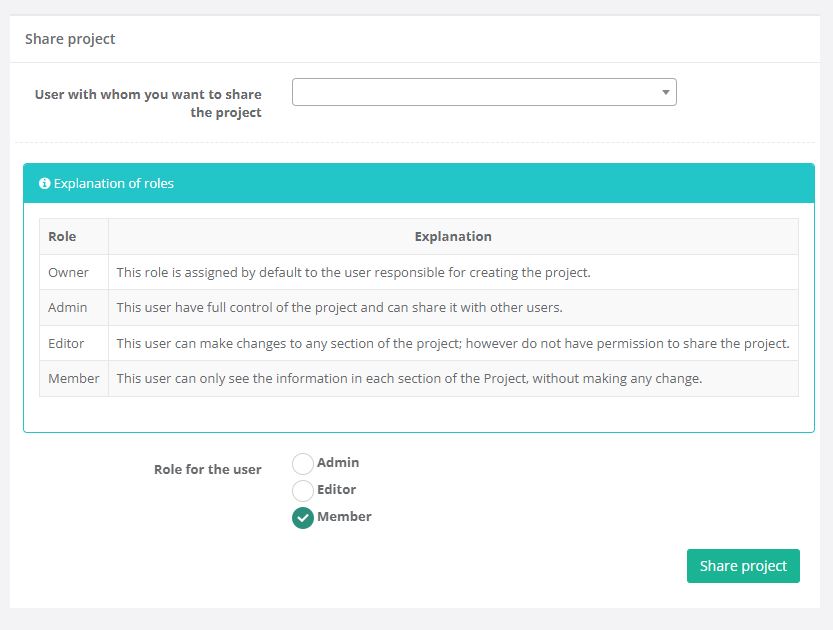
ClimMob allows you to collaborate by sharing your project with other users. When you invite someone, you must assign a role that defines what level of access they will have:
- Owner – Automatically assigned to the person who created the project. Owners cannot be changed.
- Admin – Full control of the project, including permission to share it with others.
- Editor – Can modify any section of the project but cannot share it with new users.
- Member – Read-only access. Members can view all information but cannot make changes.
Share your project
How-to share a project with other users:
-
In ClimMob, open the Project overview and go to the Share project section.
-
Enter the email of the user you want to invite.
-
Select the role (Admin, Editor, or Member) that best fits their level of participation.
-
Confirm to share the project. The invited user will now have access according to the role you assigned.